GitHub Actions vs Zippy: CI/CD Without context switching
Published March 11, 2026
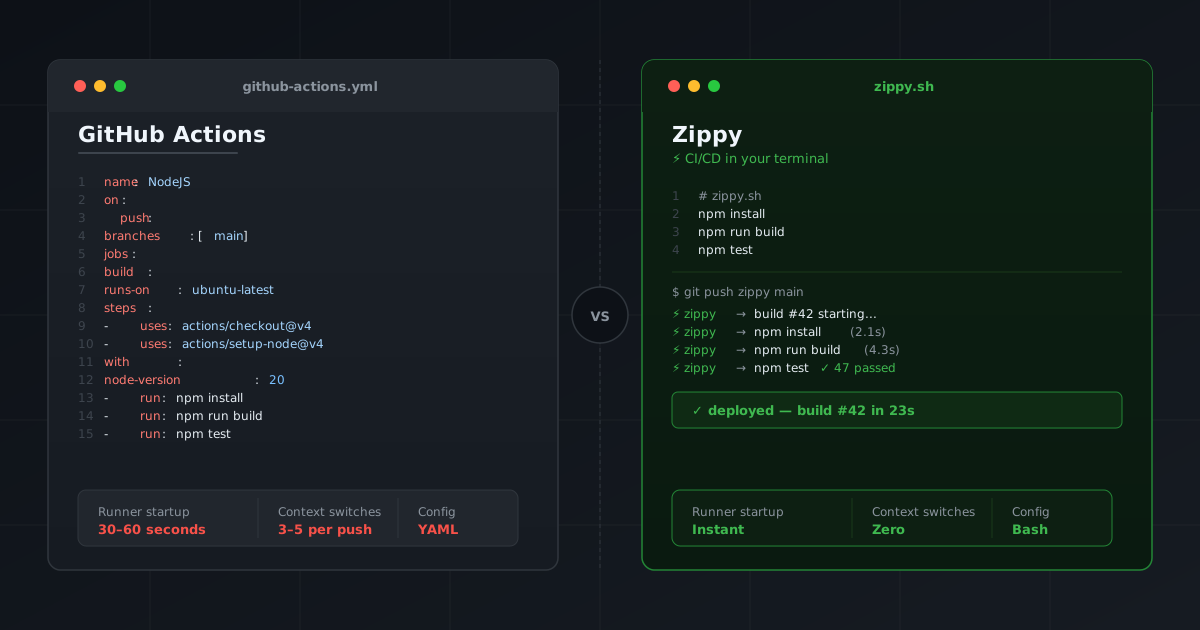
You push your code. Then the ritual begins. Go to the browser, Find the actions tab on your repository, Wait for the runner to start. Refresh and wait for the build to be succesfull. Go back to your terminal or IDE, and repeat this for every single push. If this sounds familiar, we know. This context switch is what we pay for with traditional CI/CD tools. And we have accepted it as normal. But at zippy we believe it doesn’t have to be.
How github actions work.
GitHub Actions is most likely the default CI/CD choice nowadays, and for good reasons. The integration with GitHub, a massive plugin ecosystem of pre-built actions, and it works well for most usecases. A simple basic Node.JS pipeline could look like this
name: NodeJS

on:
  push:
    branches:
      - main

jobs:
  npm:
    runs-on: ubuntu-latest
    steps:
      - name: Checkout code
        uses: actions/checkout@v4
      - name: Cache dependencies
        uses: actions/setup-node@v4
        with:
          node-version: 20
          cache: 'npm'
      - run: npm install
      - run: npm run build
      - run: npm test
Tt works. But what happens after you push?
- GitHub queues your job
- A runner spins up (this alone can take 30–60 seconds)
- Your build runs
- You open a browser to check the result
- You wait, refresh, and scroll through logs
- You switch back to your terminal
Every push is a context switch. And context switches are productivity killers.
How Zippy Works
Zippy takes a different approach. Instead of a dashboard, the build output comes directly to your terminal, right after git push.
Your entire pipeline is a bash script called zippy.sh:
# zippy.sh - this is your entire pipeline
npm install
npm run build
npm test
Then you add Zippy as a git remote once:
git remote add zippy git@zippy.sh:organization/your-appAnd from now on, every push gives you simple output:
git push zippy main
⚡ zippy → build #42 starting...
⚡ zippy → npm install (2.1s)
⚡ zippy → npm run build (4.3s)
⚡ zippy → npm test ✓ 47 passed

✓ deployed — build #42 in 23s
Zero browser. Zero context switch. You do not leave your terminal.
Side-by-Side Comparison
| GitHub Actions | Zippy | |
|---|---|---|
| Pipeline setup | Write 200 lines of YAML | Write a simple bash script |
| Getting started | Takes a day to set up | Push to get started |
| Environment | Build your pipeline twice, local and remote | Single environment |
| Feedback | Wait ages, refresh job page | See output instantly |
| Context | Pulls you out of your workflow | Stay in your work context |
| AI compatibility | Claude Code doesn’t get it | Claude Code works seamlessly |
When GitHub Actions Makes Sense
Github Actions makes sense for teams with compliance requirements, complex approval gates, or deep integrations across multiple GitHub repositories, where the added configuration overhead is worth the flexibility.
When Zippy Makes Sense
Zippy is built for organisations teams and developers that believe CI/CD should get out of your way. Complex pipelines are an anti-pattern that defy the agile principles of shipping early and continuously. If you value flow, fast feedback, and keeping your hands on the keyboard, Zippy is the right choice. Your terminal and IDE is all you should need.
The Bottom Line
GitHub Actions is a powerful but complex platform. If you want massive pipelines that go over multiproject, GitHub actions is probably the right choice. If you want developer flow instead of context switching after every push, Zippy is definitely your right choice.